My Dream Store!
- 4.6
- Rating
- 10.00M
- Installs
- Free
- Price

 Analysis by App-foxy
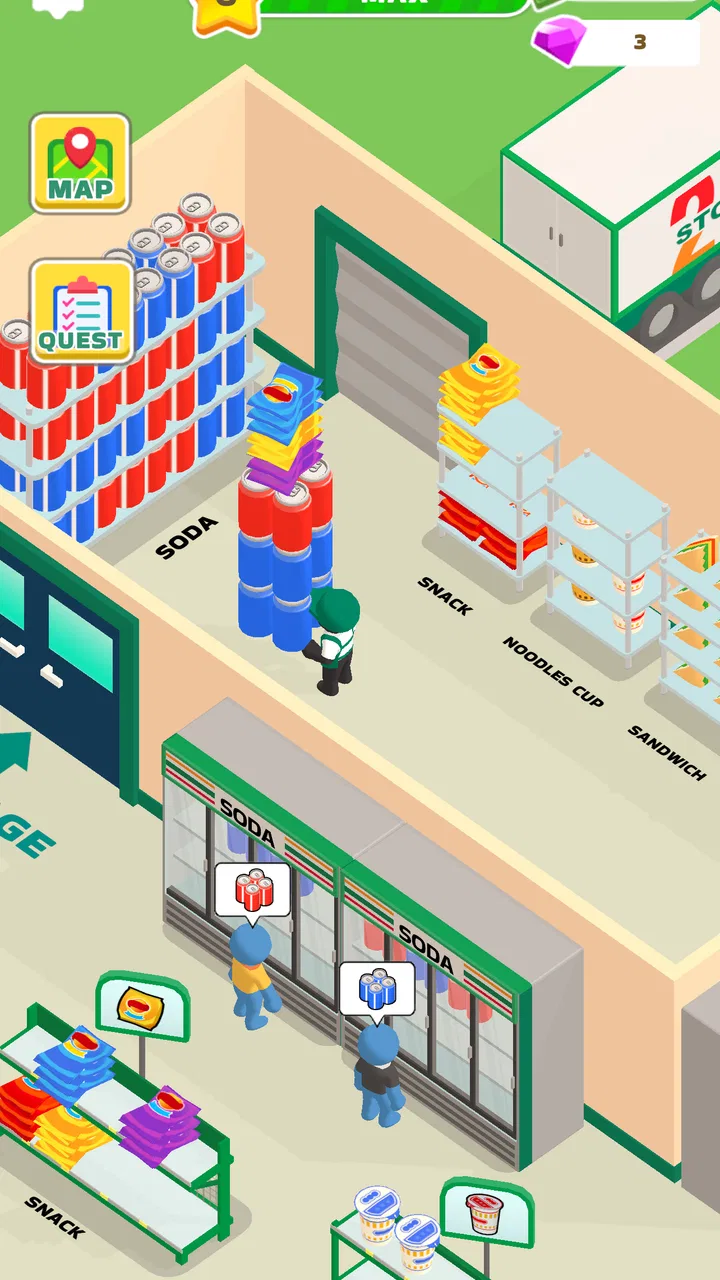
I spent time with My Dream Store as a light role-playing supermarket simulator, and its appeal became clear very quickly: it turns ordinary shop work into a sequence of small, satisfying tasks. You organize shelves, keep products available, and step into the cashier role while trying to make the store run more smoothly. It is the kind of game that works well in short sessions, especially when I want something calm and easy to understand rather than a demanding adventure.
That simplicity also makes it interesting on a shared phone or tablet. Someone can pick it up for a few minutes, restock a section, and put it down without needing a long explanation. At the same time, it is not a deep business-management simulation, so expectations matter. If you want detailed accounting, complex staff management, or a highly strategic economy, this is probably too streamlined. If you enjoy visible progress through tidy spaces and repeated improvements, it has a pleasant rhythm.
How a shared device changes the experience
In a household where several people use the same device, this game is easy to understand because the basic fantasy is immediately visible. One person can focus on arranging the store, another can enjoy the cashier moments, and a younger player can simply explore the supermarket routine. There is no need to learn a complicated rulebook before the game becomes enjoyable. The store itself acts as the tutorial: empty or untidy areas suggest what needs attention, while stocked shelves and active checkout work make progress feel obvious.
You May Also Like

 Blood Strike: 2.5 Anniversary
Blood Strike’s Loadouts Turn Every Drop Into a Tactical Gamble
A close look at Blood Strike’s custom loadouts: how fast access to signature weapons reshapes its battle royale rhythm, rewards preparation, and narrows the gap between fights.

 Pandora - Music & Podcasts
Pandora’s Music Is Easy to Start, but Harder to Recover
Pandora’s strength is its low-effort path from a seed to a station. Its weak spot is how much confidence it asks you to place in connection, setup, and quiet recovery.

 8 Ball Pool
 Is Built on Rivalries, Rematches, and Routine
A close look at the rivalries, rematches, shared routines, and unanswered safety questions that turn a quick pool match into a persistent mobile community.

 Samsung Music
’s Quiet Strength Is Playing What You Already Own
Its reach comes less from spectacle than from dependable access to a personal library. That simplicity is both the app’s strongest retention engine and its ceiling.

 AccuWeather: Weather Radar
AccuWeather Review: A Quick, Clear Forecast for Everyday Decisions
For everyday plans, the best forecast is the one you can understand quickly. AccuWeather makes rain timing, radar, and local conditions easy to act on, with a few trade-offs.

 Hill Climb Racing
Why Hill Climb Racing Still Turns Crashes Into One More Run
A tiny car, a bumpy hill and one more upgrade: Hill Climb Racing keeps resurfacing because its simple chaos makes every near-miss feel personal.
More From Our News Desk
View All News


I found that this makes the game suitable for casual handoffs. A parent might play while waiting for an appointment, then let a child try it later. A partner could organize the shop in one session, leaving the next player to continue the work. That shared-use appeal comes from the straightforward loop rather than from any special family feature. The game should be treated as a title that happens to be easy to pass around, not as a platform with built-in household coordination.
The most enjoyable shared routine is to agree on a simple goal before handing over the device. One player can concentrate on making the store look orderly, while the next tries to keep the operation moving through cashier duties and stocking. This turns a solitary progression loop into a small cooperative conversation, even though the game itself remains a single-player experience from the user’s point of view.
There is a practical limitation here: progress belongs to the game installation and the device environment, not automatically to each person who plays. If several people use the same phone, they should agree before changing the store. A child who moves things around may not understand that another player had a preferred layout, while an adult may accidentally continue a session without realizing someone else was using it. The safest approach is simple communication: say who is playing, what they plan to change, and when they are finished.
Why the supermarket setting works for short sessions
The supermarket theme gives every action a familiar purpose. Restocking is not presented as an abstract upgrade menu; it feels connected to keeping a shop ready for customers. Cashier work adds a more active moment, while organization provides a quieter alternative. That contrast is useful when sharing the device because different players can enjoy different parts of the same game without needing separate modes.
For me, the strongest everyday scenario is a short evening break. I can open the game, notice that one part of the store needs attention, work through a few tasks, and stop after the shop feels more complete. It does not demand the same commitment as a story-heavy role-playing game, where stopping halfway through a mission can feel inconvenient. This makes it a good fit for waiting rooms, commutes, or a few minutes after finishing household chores.
However, the routine can become repetitive if I play for too long at once. The same appeal that makes the game accessible also limits its variety. The experience is built around running the store rather than constantly surprising me with new narrative situations. I recommend treating it as a compact relaxation game, not as a title to marathon for hours every day.
Setting boundaries before anyone starts playing
Because the game is free to download, it is easy for someone in the household to try it without much preparation. It is listed for Everyone, which matches the approachable supermarket concept and the absence of a need for mature storytelling to understand the objective. Still, an age label is not a substitute for an adult checking how a child uses a shared device. The important boundary is not whether the game is difficult to understand; it is whether the device, account, and purchase settings are already arranged for the person using it.
The game includes optional in-app items priced from $1.99 to $19.99 per item. That is the first conversation I would have before handing over a phone or tablet. A child may see an item as part of normal progression, while the account holder sees it as a real charge. I would make the rule clear: play is allowed, but purchases require permission. On a shared device, this matters even more because one person’s tap can affect the account used by everyone else.
I also recommend agreeing on whether players may reorganize the store freely. Organization is one of the pleasures of the game, but a shared layout can become a source of friction. A useful household rule is to let each player make changes during their own session, then avoid undoing someone else’s work without asking. If the family prefers consistency, choose one person to decide the overall arrangement and let others handle stocking or cashier tasks.
Another sensible boundary concerns session length. The game is easy to keep reopening because its tasks are small and its progress is visible. That can be positive, but it can also encourage repeated checking. A simple stopping point—such as finishing a stocking task or completing a short store objective—helps younger players understand when to put the device down. This is not a feature of the game; it is a practical habit that makes the game easier to fit into household routines.
Keeping account expectations clear
The title comes from Supercent, Inc., and its store presence shows a strong audience: it has passed 10 million installs and holds a 4.6 average from roughly 58 thousand ratings. Those figures suggest that many people find the basic supermarket loop approachable, but popularity does not remove the need for sensible account boundaries. A shared device still has one payment environment, one saved game context, and possibly one person responsible for approving purchases.
I would avoid presenting the game to children as if every visible improvement were automatically free. Instead, explain that the store can be played without paying, while optional items may appear during use. This creates a healthier expectation and prevents confusion when a player sees something that speeds up or changes the experience. The game is free, but “free to start” and “nothing can ever cost money” are not the same promise.
For adults sharing the device, the boundary is less about supervision and more about preserving each person’s preferred progress. Before resetting, reinstalling, or handing the phone to someone else, check that everyone is finished. A casual simulator can feel disposable, yet a carefully arranged store may represent several sessions of personal effort. The relaxed presentation should not be mistaken for progress that nobody cares about.
Coordinating roles without overcomplicating the game
My favorite way to share this game is to divide attention by activity rather than pretending that several people are controlling the same store at once. One player can be the organizer, deciding where products should go and keeping the shop visually coherent. Another can act as the operator, focusing on stocking and cashier work. These roles are informal, but they give each person a reason to participate.
This arrangement also reveals a useful trade-off. The organizing role is slower and more deliberate, while cashier work feels more immediate. A player who wants action may lose interest if asked only to arrange shelves. Someone who enjoys tidying may find constant cashier duties tiring. Letting people switch roles between sessions keeps the shared experience fair without requiring any special multiplayer system.
For a household with one regular player and occasional visitors, I would keep a small verbal record of the current plan. “The next session is for stocking” or “please leave the front area as it is” is enough. The game’s straightforward structure does not need a spreadsheet or a detailed schedule. In fact, over-organizing it would remove some of its casual charm.
There is also a good opportunity to use the game as a gentle introduction to sequencing. A player can decide whether to tidy first, stock first, or handle cashier responsibilities first, then notice how that choice affects the feel of the session. This is not a complex economic lesson, and I would not oversell it as one. It is simply a low-pressure way to practice choosing a priority and completing a small routine.
What I would do during a typical household session
If I were sharing a tablet with a family member, I would start by asking what kind of session they wanted. If they wanted something active, I would leave the cashier work to them. If they preferred a calmer activity, I would let them organize shelves and decide how the store should look. Afterward, I would take a moment to check what changed before starting my own tasks. That small pause prevents accidental frustration and makes the handoff feel intentional.
I would also avoid judging progress only by how much the store expands or improves. The game is more enjoyable when the session has a manageable purpose. Finishing a stocking job, making one area feel orderly, or completing a short cashier sequence can be enough. This mindset is especially useful for children or casual players who may not care about maximizing every possible reward.
The trade-off is that coordination can expose the game’s limited depth. Once everyone understands the basic rhythm, there may not be many fundamentally different ways to divide the work. That is fine for occasional shared play, but a household looking for a long-term cooperative game should choose something designed around multiple players, communication, and distinct team objectives. My Dream Store works better as a pass-and-play-friendly solo game than as a true family multiplayer experience.
Age, trust, and the right kind of player
The Everyone rating makes the game approachable for a broad audience, and I agree that its supermarket setting is easy to grasp. A child can understand that shelves need products and that the cashier is part of keeping the shop running. An adult can enjoy the same loop as a relaxing break. The difference is not whether the game can be understood, but how much guidance each player needs around purchases, session limits, and shared progress.
For younger players, I would introduce the game with an adult nearby during the first session. That is mainly to explain what each action does and to establish the purchase rule before any optional item appears. Once the child understands the routine, the game is simple enough to revisit independently, provided the household is comfortable with the device and account arrangement.
Trust matters for older children and siblings as well. A shared store can become a small responsibility exercise: players need to leave the device in a usable state and respect the arrangement chosen by someone else. If that kind of cooperation is already difficult in the household, this game may create more arguments than enjoyment. A separate device or a different game with clearer individual profiles would be a better choice in that situation.
I would also be careful about recommending it to someone who expects a traditional role-playing game. Although it sits in the role-playing category, its appeal is not character drama, tactical combat, or a long branching story. The role comes from managing the shop and stepping into its daily operations. Players who want exploration and narrative should look elsewhere; players who like simulation-flavored routines may find the category label less important than the actual activity.
Where it stands beside other casual management games
Compared with a spreadsheet-like business simulator, this game is friendlier and less intimidating. It puts the emphasis on visible shop activity instead of asking the player to study dense financial screens. That makes it better for a quick break and for shared-device use, but weaker for anyone who wants detailed control over margins, staffing, supply chains, or long-term business strategy.
Compared with a purely idle shop game, it feels more hands-on because the player is asked to participate in organizing, stocking, and cashier work. That involvement is its main advantage. The cost is repetition: an idle alternative may be more convenient when I want progress without attention, while this game expects me to remain engaged with the store routine.
It also differs from story-led role-playing games by making the environment, rather than a cast of characters, the center of progress. That is why it suits a household where people want to take turns casually. There is less narrative context to lose between sessions. On the other hand, players who need emotional stakes or a strong sense of adventure may find the supermarket setting too narrow.
Version, access, and the final household decision
The current version is 3.5.0, and the game runs on Android devices using version 6.0 or later. That makes it relevant for people using an older compatible phone or tablet, though the actual comfort of play will still depend on the device’s screen and performance. On a shared tablet, the larger display can make the store easier to inspect, while a phone is more convenient for quick personal sessions.
Since the game is free, trying it is straightforward. I would recommend starting with a short session rather than immediately treating it as a permanent household activity. See whether the family enjoys the repeated cycle of organizing, stocking, and cashier work. If one person likes the store while everyone else finds it repetitive, it may be better to keep it as that player’s personal game rather than forcing a shared routine.
My strongest practical recommendation is to set three rules before installation becomes a source of disagreement: purchases need approval, players announce when they are taking a turn, and nobody resets or radically rearranges the store without asking. Those rules address the real household risks more effectively than pretending the game is a multiplayer experience. They also preserve what makes it appealing—the freedom to make the supermarket feel personal.
For me, the game succeeds because it gives ordinary retail tasks a gentle sense of progress. I like being able to switch between tidy organization and more active cashier work, and I appreciate that a session can have a clear beginning and end. The weaknesses are equally clear: the loop can feel repetitive, the management layer is lighter than in serious business simulators, and optional purchases mean a shared account needs adult attention.
My Dream Store is a good choice for households wanting a calm, approachable game that people can pass around, but not a substitute for a real cooperative title or a deep management simulator. I would recommend it to casual players, families willing to set simple account boundaries, and anyone who enjoys turning a messy virtual shop into an orderly one. I would skip it if your priority is complex strategy, rich storytelling, or separate profiles for every member of the household. For the right audience, though, its modest scope is part of the charm: it gives you a small store to manage and just enough responsibility to make each short session feel worthwhile.
FAQs for My Dream Store!
01What is My Dream Store! and what does it offer?
My Dream Store! is a versatile e-commerce app available on Android and iOS, designed to provide users with a platform to create and manage their own online stores. It offers a wide range of customizable templates, secure payment integration, and marketing tools to help users maximize their sales potential. The app is perfect for entrepreneurs looking to expand their business digitally.
02Is My Dream Store! user-friendly for beginners?
Yes, My Dream Store! is designed with user-friendliness in mind. It features an intuitive interface that guides users through the process of setting up their store step by step. Even without technical knowledge, users can easily customize their storefront, upload products, and manage orders, making it accessible for beginners and experienced sellers alike.
03What are the main features of My Dream Store!?
My Dream Store! includes features such as customizable store templates, integrated payment gateways, inventory management, and analytics tools. Users can also access marketing support, including SEO optimization and social media integration, to enhance their store’s visibility and sales. These features are aimed at providing a comprehensive solution for online selling.
04Are there any costs associated with using My Dream Store!?
While My Dream Store! offers a free version with basic features, there are premium plans available that unlock additional functionalities such as advanced analytics, more customization options, and priority customer support. Users should review the pricing structure to determine which plan best fits their business needs.
05How secure is My Dream Store! for handling transactions?
My Dream Store! prioritizes security, utilizing robust encryption protocols to ensure the safety of user data and transactions. It offers secure payment options, including integration with trusted payment gateways like PayPal and Stripe, to safeguard financial information and provide users with confidence when conducting commerce on the platform.
Pros
- User-friendly interface for easy navigation.
- Wide range of customizable product options.
- Seamless integration with social media platforms.
- Fast and responsive customer support.
- Secure payment gateways ensure safe transactions.
Cons
- Limited international shipping options.
- Occasional app crashes on older devices.
- Customization tools can be complex for beginners.
- High transaction fees for some payment methods.
- Limited analytics available for sales tracking.

My Dream Store!
Gallery